Convert an image to text in your browser.
Drop a photo or a scan and get the writing in it back as text, ready to paste into ChatGPT, Claude or Gemini.
- PNG, JPG, WebP and TIFF read here
- Read when you ask, never on its own
- No sign-up, no account
Drop your image here
Recognised in your browser when you ask.
What a photo looks like once FileConcat has read it
A sample photo of a whiteboard, read after you ask. Recognition gets close, not exact.
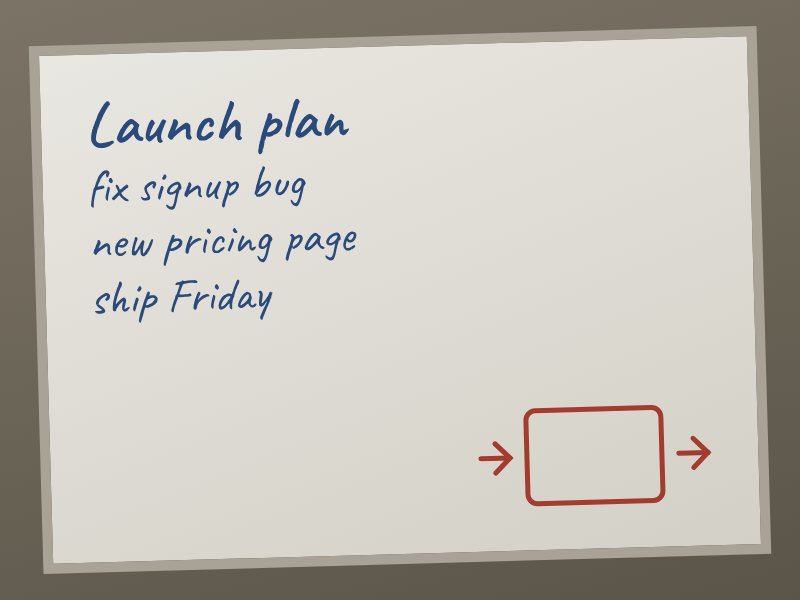
- text below was read by recognition, a guess at the characters rather than the file's own: whiteboard.jpg

<file path="whiteboard.jpg" language="jpg"><![CDATA[
Launch plan
| fix signup bug
new pricing page
| chip Friday |
| |
>
|
]]></file>
Sample photo, read by FileConcat 2.2.
What comes through, and what does not
In the text
- Writing in the image, read by text recognition when you ask.
Not read
- A photo with no writing gives nothing. Layout is not kept.
Forty screenshots, one file to paste
Drop a folder of screenshots, ask FileConcat to read them, and they come back as one text file, each under its own name, with a token count for the whole set.
screenshots/
  error-dialog.png
  receipt-march.jpg
  settings-page.png
  whiteboard.jpg
It reads more than images
- PDF to textPage by page, scans included.
- Word to textHeadings, tables and footnotes kept.
- Excel to textEvery sheet under its name.
- PowerPoint to textSlide by slide.
Also EPUB, email, notebooks, subtitles and ZIP archives.Every format it reads
Common questions
Is my image uploaded to a server?
Not to us. FileConcat reads the image in your browser and there is no account to create. The only upload is the one you choose to make, when you paste or attach the text at your assistant.
Which languages does it read?
60 of them. FileConcat starts from your browser's language and you can pick another before it reads. Each language is a one-time download of under 4 MB. Pick the one the writing is in: mixing two reads worse than either alone.
What happens to drawings and layout?
They are not read. Recognition reads writing only, so a box or an arrow gives no text, and lines come back without their place on the page. Check the reading before you rely on it.
Can I get plain text without tags?
Yes. Set Format to Plain before you copy or download. The tags go, and each file sits between two rules with its name, under a short summary and the file list.
Can I convert many images at once?
Yes. Drop several files or a whole folder. They come back as one text file with each image under its own name, so an assistant that limits attachments takes them as one.
Drop your image and copy the text
Drop your image here
Recognised in your browser when you ask.